Embeddings: Turning Meaning into Geometry
How embedding models map text to vectors, how cosine similarity works, and what it takes to run semantic search reliably at scale.
On this page
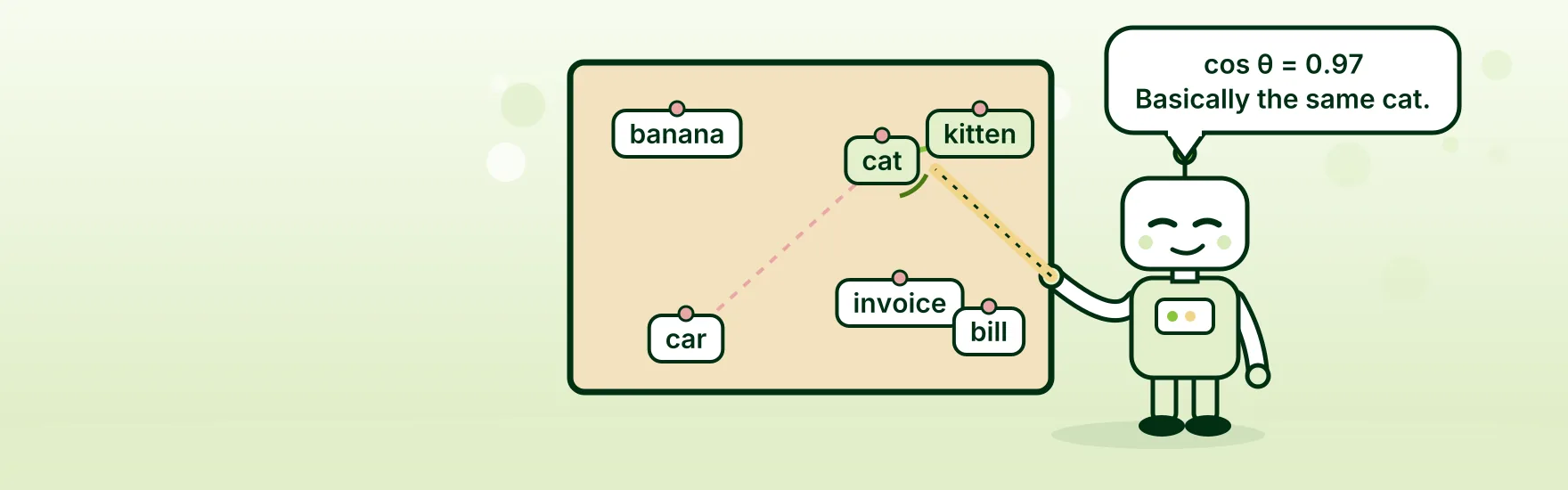
Keyword search fails the moment a customer writes "bill" and your documentation says "invoice". Embeddings fix that by representing text as points in space, placed so that texts with similar meaning land close together. Once meaning is geometry, "find related text" becomes "find nearby points", which computers do extremely well.
What an embedding is
An embedding model reads a piece of text and returns a fixed-length list of numbers, typically a few hundred to a few thousand of them. That list is a vector: a point in a high-dimensional space. The model was trained so that paraphrases, translations and closely related ideas map to nearby points, while unrelated text ends up far apart.
Two things are worth internalising early:
- The dimensions are not labelled. No single number means "about billing". Meaning is spread across all of them, so you cannot debug an embedding by reading it. You debug it by looking at what it retrieves.
- One vector per input. If you embed a 20-page document, all of its topics get averaged into a single point that represents none of them well. That is why documents are split into chunks before embedding (more on that in RAG).
Measuring closeness: cosine similarity
The standard way to compare two embeddings is cosine similarity: the cosine of the angle between the two vectors. It runs from 1 (same direction) through 0 (unrelated) to -1 (opposite). Because it only looks at direction, the length of a vector, which often tracks how long or wordy the text was, does not affect the score.
Drag the arrows to get a feel for it. Watch how stretching vector B changes the raw dot product but leaves the cosine untouched.
In practice you normalise every vector to length 1 when you store it. Then cosine similarity is just a dot product, and scoring a query against your whole collection becomes a single matrix multiplication:
import numpy as np

def normalise(m):
    m = np.asarray(m, dtype=np.float32)
    return m / np.linalg.norm(m, axis=-1, keepdims=True)

doc_matrix = normalise(doc_vectors)        # shape (n_docs, dim), done once at index time

def search(query_vector, k=5):
    q = normalise(query_vector)
    scores = doc_matrix @ q                # cosine similarity for every document at once
    top = np.argpartition(-scores, k)[:k]  # k best, unordered
return sorted(((int(i), float(scores[i])) for i in top), key=lambda x: -x[1])Generating embeddings
You can call a hosted embedding API or run an open model yourself. The shape of the work is the same: send batches of text, get back one vector per input, in order. Here is the self-hosted version with an open model:
from sentence_transformers import SentenceTransformer

model = SentenceTransformer("all-MiniLM-L6-v2")  # small, fast, 384 dimensions

chunks = [c.text for c in load_chunks()]
vectors = model.encode(
    chunks,
    batch_size=64,
    normalize_embeddings=True,   # unit length, so dot product == cosine
    show_progress_bar=True,
)
Three decisions here have long-term consequences:
- Model choice. Larger models usually retrieve better but cost more to run and produce bigger vectors. Benchmark on your data: a model that tops a public leaderboard may not be best for legal contracts or support tickets.
- Dimension. Storage, memory and search time all grow with vector length. Some models let you truncate vectors to a shorter prefix with modest quality loss, which is handy at large scale.
- Version. Vectors from different models, or even different versions of the same model, live in different spaces and cannot be compared. Store the model name and version with every vector, and treat a model upgrade as a full re-embedding migration.
Searching: top-k with a threshold
Nearest-neighbour search always returns something. Ask a support knowledge base about holiday packages and it will happily return its least-irrelevant chunk. That is why production search returns the top k results above a score threshold, and treats "nothing above the threshold" as a real answer.
Thresholds are not universal. A score of 0.5 can be strong for one model and weak for another, so calibrate on your own labelled queries. Plot the scores of known-good and known-bad matches and pick the cut-off where they separate.
Scaling up: approximate search
Comparing a query with every stored vector (brute force) is exact and perfectly fine up to a few hundred thousand vectors. Beyond that, you need an approximate nearest neighbour (ANN) index, which finds almost the best matches while skipping most of the comparisons.
| Index | How it works | Strengths | Trade-offs |
|---|---|---|---|
| Flat (brute force) | Compare against everything | Exact, simple | Linear cost per query |
| HNSW | Layered graph you walk from coarse to fine | Very fast queries, high recall | Memory hungry; slower inserts |
| IVF | Cluster vectors, search only the nearest clusters | Lower memory | Needs training; recall drops if data drifts |
| IVF + PQ | Clusters plus compressed vectors | Fits huge collections in RAM | Lower accuracy; needs tuning |
Every ANN index has a knob that trades recall (how many true neighbours it finds) against speed. Turn it with measurements, not intuition.
Where embeddings fall short
- Exact identifiers. Order numbers, error codes and SKUs have little "meaning" to embed, so a query for
INV-20931may not surface the one document containing it. Pair vector search with keyword search (hybrid search) for these. - Negation and small qualifiers. "Refunds are allowed" and "refunds are not allowed" can sit very close together. Retrieval finds the topic; the language model, reading the full text, must judge the detail.
- Freshness. An index is a snapshot. When a source document changes, re-embed it and delete the old vectors, or retrieval will keep serving the past.
Measuring retrieval
You can't tell whether retrieval works by trying a few queries. Build a small labelled set (queries paired with the chunks that should answer them) and track recall@k: the share of queries where a correct chunk appears in the top k.
def recall_at_k(eval_set, search, k=5):
    hits = 0
    for item in eval_set:                       # {"query": ..., "relevant_ids": {...}}
        found = {doc_id for doc_id, _ in search(embed(item["query"]), k=k)}
        hits += bool(found & item["relevant_ids"])
    return hits / len(eval_set)
Run it whenever you change the model, the chunking or the index settings. It is the number that tells you whether a change helped, and it is the ceiling on everything downstream: a model cannot answer from a chunk it was never given.
Next: Retrieval-augmented generation builds a complete question-answering pipeline on top of this search layer.